Free Tetris Alternative for Kids (No Ads)
By Jangul Aslam · Published 2026-06-04
Tetris is the falling-blocks puzzle almost everyone has played: rotate the pieces, slot them together, clear full rows. The trouble starts when you go looking for a free one. The official versions push ads and premium tiers, and the "free tetris" clones that fill search results tend to bury kids under banner ads, pop-ups, and "tap to continue" traps. If you just want a genuinely free, safe, ad-free falling-blocks game for a child — or for yourself on a coffee break — here's one that simply works.
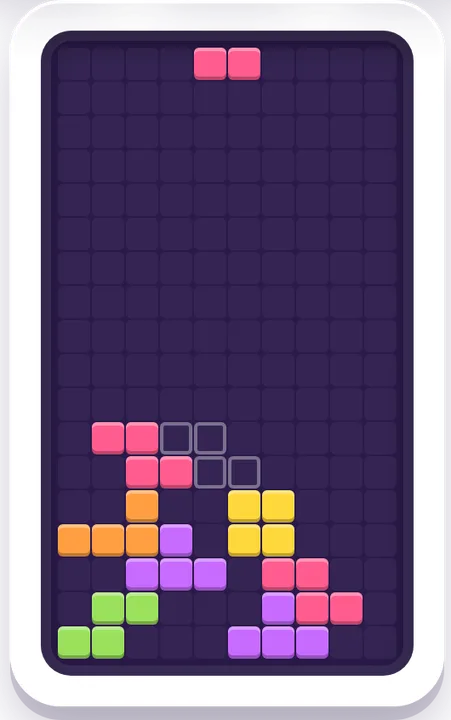
Block Drop on iplay.free is a falling-blocks puzzle in the Tetris mold that plays instantly in your browser: no ads, no sign-up, no download, nothing to buy. It's our own friendly take on the classic — not the official Tetris, just the same satisfying idea with the friction stripped away.
What is Block Drop?
Blocks fall from the top of the grid one at a time. You slide them left and right and spin them to fit, and when you fill a complete row it clears and you score. Keep your stack tidy and the rows keep clearing; let it pile up to the top and the round ends. There's a line-clear goal to aim for at each level, so younger players get a real "I won!" moment instead of an endless climb.
It's the puzzle people already love, with the friction removed: open the page and play.
Why it's a better free Tetris for kids
- No ads, no pop-ups, no tracking — nothing to mis-tap, no personal details collected, safe to hand to a child.
- No account, no download — it runs in any browser on a phone, tablet, or computer; no app store, no sign-in.
- Touch and keyboard controls — big on-screen buttons to move, spin, and drop, plus arrow keys on a laptop. It works on a tablet without a keyboard.
- A landing guide for new players — switch on the ghost outline that shows where a piece will land, so younger kids can place blocks without the panic.
- Pick your speed — Easy, Medium, and Fast levels, so a 7-year-old and a teenager can both find a pace that fits.
- Quietly good for them — it builds spatial reasoning, planning a move ahead, and quick decisions, without feeling like a lesson.
Tetris vs. Block Drop at a glance
| Tetris (official) | Block Drop (iplay.free) | |
|---|---|---|
| Price | Free with ads; premium tiers | Free, forever |
| Account | Sign-in on many apps/sites | None |
| Ads / tracking | Ad-supported on most versions | None |
| Controls | Keyboard / app gamepad | On-screen buttons + arrow keys |
| Difficulty | Speeds up endlessly | Easy / Medium / Fast — you choose |
| Beginner help | — | Landing guide (ghost piece) + line goal |
| Best for | Teens & adults | Ages 7+, younger with help |
| How it runs | Browser / app / console | Any browser, no download |
Is it good for kids?
Yes — it's an easy "screen time you don't have to police." Because there are no ads, no chat, and no account, there's nothing inappropriate to stumble into and no personal details to hand over. We suggest ages 7 and up for playing solo, with the landing guide switched on for newer players. Younger kids do great sitting with a grown-up who calls out "spin it… now slide left." Set it to Easy and the gentle pace keeps it fun rather than frantic.
How to play in 30 seconds
- Use the left/right buttons (or arrow keys) to slide the falling block across.
- Tap rotate (or the up arrow) to spin it so it fits the gap.
- Press down to drop it faster once you've lined it up.
- Fill a complete row to clear it — clear the line target for your level to win, then keep stacking for a high score.
Turn on the landing guide in Settings if you'd like to see where each piece will fall.
More free, no-ad games
If your kid takes to Block Drop, keep going — all of these are free and ad-free too:
- Brick Bop — a paddle-and-ball arcade game: bounce the ball off your paddle and break every brick, catching the power-ups as they fall. Three lives, and it's fine from age 5.
- Snake — guide the snake to the food and grow longer; simple controls, a little forward planning.
- 2048 — slide and combine the tiles to reach 2048; number sense and planning one move ahead.
- Candy Match — swap to line up three or more; quick pattern spotting.
Browse the whole set of free arcade games, see every free game, or read our age-by-age guide to free, no-ad games that build kids' skills.
Ready to play? Open Block Drop — free, no ads →