
Free Minesweeper Online (No Ads)
By Jangul Aslam · Published 2026-06-24
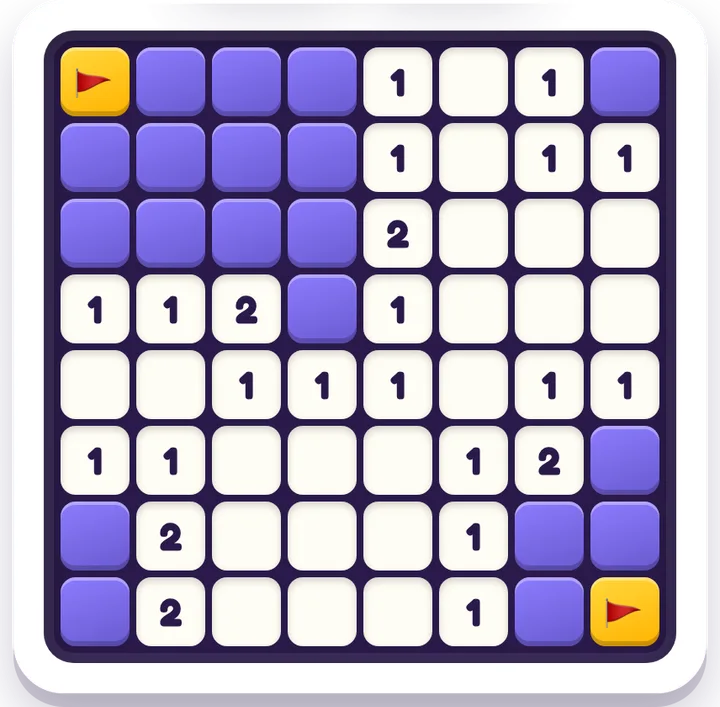
Search for "free Minesweeper online" and most of what you find wants something first: an app install, a sign-up, a notification prompt, or an ad banner sitting right on top of the board. For a puzzle that's existed, unchanged, since the early 90s, that's a lot of friction. If you just want to open a clean grid and start digging, here's one that does exactly that.
Minesweeper on iplay.free is the classic mine-finding logic puzzle, free in your browser: no ads, no sign-up, no download, nothing to buy. Pick a level, tap a square to dig, and use the numbers to figure out where the mines are hiding.
What is Minesweeper?
Minesweeper is a board of hidden squares, some of which conceal mines. When you dig a safe square, it shows a number: how many of the eight squares touching it contain mines. A blank (zero) means no mines nearby, so the board opens up around it. Your job is to use those numbers to deduce which squares are safe and which are mines — and clear every safe square without setting one off. Mark the mines you've worked out with a flag so you don't dig them by accident.
It's pure deduction under uncertainty — no luck-of-the-draw, no twitch reflexes, just reading the clues. (Trivia: Minesweeper shipped with Windows 3.1 in 1992 and went on to become one of the most-played computer games ever — most of us learned it by accident.)
Why play it here
- No ads, no pop-ups, no tracking — nothing covering the board, nothing to mis-tap, nothing collected. Safe to hand to a child.
- No account, no paywall — you don't sign in or pay; you open the page and play.
- Three difficulty levels — start on Easy, step up to Medium, then Hard. Bigger boards pack in more mines.
- Help when you're stuck — a built-in Hint nudges you toward a safe square, and a Rules card explains everything in a sentence. Switch on Flag mode to mark suspected mines.
- No language barrier — it's numbers and logic, so it plays the same in any language (the site itself is available in 12 languages).
- Plays anywhere — phone, tablet, or desktop; it's light enough for slow connections, and nothing about your game is sent anywhere.
Free Minesweeper vs. typical Minesweeper sites
Here's the honest comparison most "free Minesweeper" pages won't put in writing:
| Typical Minesweeper sites / apps | Minesweeper (iplay.free) | |
|---|---|---|
| Price | "Free" but ad-funded | Free, forever |
| Ads / pop-ups | Banners, interstitials, notification prompts | None |
| Account / sign-up | Often required | None |
| Tracking | Third-party ad trackers | None |
| Difficulty | Sometimes one fixed board | 3 levels (Easy / Medium / Hard) |
| Help when stuck | Rarely | Hints + Rules + Flag mode |
| How it runs | App download or ad-heavy page | Any browser, no download |
Is it good for kids?
Yes — Minesweeper is genuinely good "screen time you don't have to police." With no ads, no chat, and no account, there's nothing unsuitable to stumble into and no data to hand over. And underneath the simple board it's a real thinking workout: logical deduction, reasoning about probability and risk, and patience. We suggest ages 8 and up to play solo; younger kids do well on the Easy board with a grown-up talking through "this number is a 1, and there's only one square left, so…". It scales up too — the Hard board is a satisfying few minutes for teens and adults.
How to play in 30 seconds
- Pick a level in Settings — start with Easy if you're new.
- Tap any square to dig. Your first dig is always safe and usually opens a big blank area.
- Read the numbers: each one counts the mines in the eight squares around it.
- Turn on Flag mode and tap a square to plant a 🚩 on a mine you've worked out.
- Clear every safe square to win. Stuck? Tap Hint.
A few beginner tips
You don't have to guess as much as it feels at first — the numbers carry more information than they look:
- If a number equals the flags already around it, every other neighbour is safe — dig them.
- If a number equals the hidden squares around it, those squares are all mines — flag them.
- Work the edges of open areas, where numbers touch unknown squares; that's where deductions hide.
- The famous "1-2-1" pattern along a wall almost always means the squares under the 1s are safe and the one under the 2 is a mine.
- Sometimes you genuinely have to guess — good play just shrinks how often. (For the deeper no-guessing tactics, that's a whole guide of its own.)
Quick answers
Is this Minesweeper really free? Yes — free forever. No ads, no sign-up, no download, and nothing to buy. Open Minesweeper and play.
Do I need an account or app? No. It runs in any browser on phone, tablet, or desktop. There's nothing to install and no login.
Can I change the difficulty? Yes — there are three levels: Easy, Medium, and Hard. Bigger boards have more mines to find.
Do I always have to guess? Almost never at the start, and rarely after. The numbers let you deduce most squares for certain; only the occasional position forces a guess.
Is it safe for kids? Yes. With no ads, no chat, and no account, there's nothing inappropriate to tap into and no data collected. We suggest ages 8 and up to play solo.
More free, no-ad logic games
If Minesweeper clicks, the rest of the free logic games hub is free and ad-free too:
- Nonogram — picture logic (Picross): use the number clues to reveal a hidden image.
- Lights Out — flip squares to turn off the whole grid; pure cause and effect.
- Flow Connect — link the matching colours without crossing the paths.
- Tower Quest — stack-and-sort logic that rewards planning ahead.
- Sudoku — the deduction classic; same "what must go here?" thinking as Minesweeper.
Fancy a different kind of classic? Solitaire just launched too. Or browse the whole logic games hub and every free game to find your next puzzle.
Ready to dig? Open Minesweeper — free, no ads →